
Pull up a chair. Let’s talk about the little box that shows up on Google when somebody searches “plumber near me” at 11 p.m. with water creeping across the kitchen floor. That box is your Google Business Profile, and for a lot of local service businesses it is the first impression, the second impression, and sometimes the only impression before the phone rings (or doesn’t).
Here’s the good news: building a strong profile is not secret wizardry. Google publishes the rules. Here’s the less fun news: most of it is boring, honest, fill-in-every-field work, and there is no shortcut where you send Google a check and float to the top. You cannot pay Google for a better local ranking. Ads are a separate thing, clearly labeled as ads. The free map listing has to be earned.
So let’s walk through every piece of it, the way we’d explain it if we were on a call and you had the profile open in another tab.
First, how Google decides who shows up
Google says local results are based mainly on three things:
- Relevance: how well your profile matches what the person searched for. If they want “water heater repair” and your profile barely admits you touch water heaters, that’s a relevance problem.
- Distance: how far you are from the searcher, or from the location they typed in. You can’t edit geography. Believe me, people have tried.
- Prominence: how well known you are, based partly on information from around the web, including reviews, links, and articles.
Almost everything below feeds one of those three. Keep them in your head. They explain why some “tricks” do nothing and some get you in trouble.
Claim and verify the listing (and actually keep the keys)
Step one is making sure the profile is yours. Search for your business on Google Maps. If a listing already exists, maybe one Google auto-created or one a former employee set up in 2017, request ownership of that one. Don’t spin up a fresh duplicate because it feels easier. Google’s guidelines call for one profile per location, and duplicates confuse customers, split your reviews, and can get listings removed.
Then verify it. Google may ask for a phone call, text, email, video, or something else depending on the business. It picks the method, not you. Annoying? Sometimes. Optional? No. An unverified profile is a profile you don’t really control.
Now the part everyone skips: login access. The profile should sit on a Google account the business controls, with at least one backup owner or manager you trust. It is shockingly common for an owner to lose a profile because “Kyle set it up,” and Kyle left, and Kyle’s Gmail is now a mystery. Write down who has access. Future you will be weirdly emotional about how grateful they are.
If you have more than one real location, each one gets its own profile. If you have one location and three trucks, that’s one location. The trucks don’t each get a listing, no matter how good the paint job is.
Business name: the name on the sign, full stop
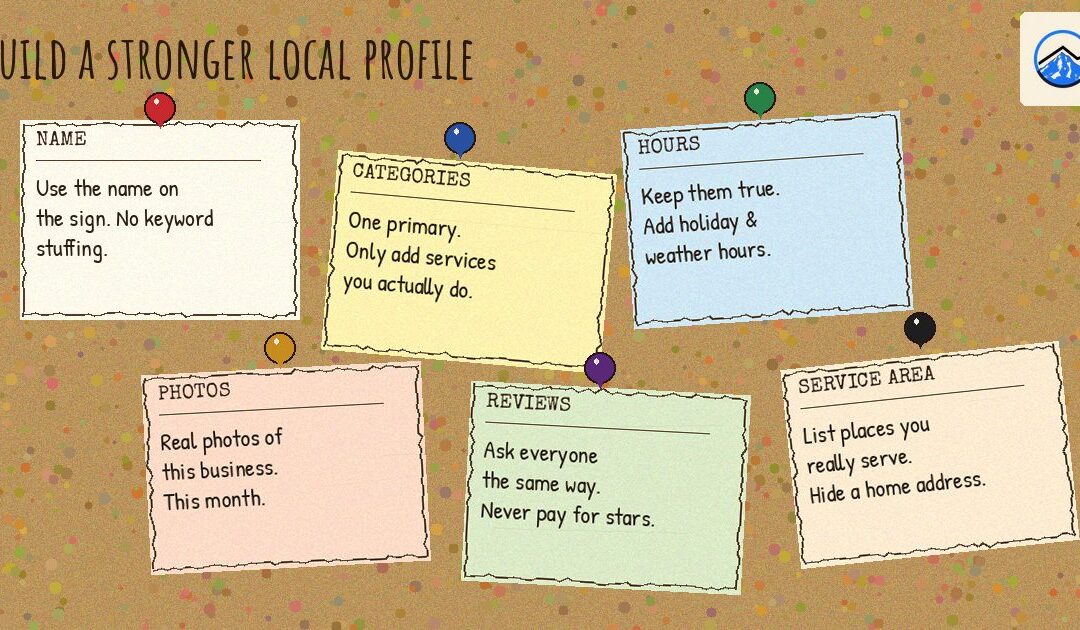
Your business name field should match the name you actually use in the real world: on the sign, on the truck, on invoices, on the website, on the thing you say when you answer the phone.
What it should not be is a keyword salad. If you’re “River City Plumbing,” your name is not “River City Plumbing | Best Emergency Plumber Portland Beaverton Drain Cleaning 24/7.” We know. We know it’s tempting. Lots of people do it, and some of them even seem to get away with it for a while. Google’s guidelines treat stuffing extra keywords, cities, or taglines into the name as a violation, and it’s a common route to a suspended profile. Getting reinstated is not a fun afternoon. It’s more like a fun month.
If your legal name is different from your public name, use the public one. If you really want a keyword in your name, the honest version is changing your actual business name, signage and all, which is a much bigger decision than typing it into a form.
Categories: pick what you are, not what you wish you ranked for
Categories are where Google figures out what kind of business you are. They’re a big relevance signal, which is why people get greedy with them.
You get one primary category and can add additional categories. The primary should be the single best description of the business. If you’re mostly an electrician, it’s “Electrician,” not “Contractor,” which is technically true in the same way that “mammal” is technically true about your dog.
Google’s advice is to use the fewest categories needed to describe your core business, and to make them as specific as possible. Additional categories are for other things you genuinely are, not a scrapbook of every search term you’ve ever wanted. A landscaper who once moved a fence is not also a “Fence Contractor.” A dental office is not also a “Spa” because the chairs recline.
Collecting unrelated categories muddies your relevance and invites the wrong phone calls. “Hi, do you do septic pumping?” “No, we’re a bakery.” “Then why does Google say…” You see the problem.
Storefront or service-area business? Tell the truth here
This one trips up a ton of contractors, cleaners, mobile groomers, and anybody else who goes to the customer.
- Customers come to you (a shop, office, studio, clinic) during your hours? Show your real street address, and staff it when you say you’re open.
- You go to the customer and don’t serve people at your address? Set the profile up as a service-area business and hide the address. If you work out of your house, Google doesn’t want your home address on the map, and honestly neither do you. Nobody needs a customer knocking on your front door at 7 a.m. asking about gutters.
- You do both (people can visit, and you also travel)? You can show the address and list service areas too. Just make sure people can actually visit during the posted hours.
And now the stern-uncle part: no fake storefronts. A PO box, a mailbox store, a virtual office, or a coworking desk you’ve never sat at is not a location. Neither is your cousin’s address in a town you’d like to rank in. Google’s guidelines say businesses need to be able to make in-person contact with customers at the address, or the address needs to be hidden. Creating a listing at an address customers can’t visit is how profiles get suspended, and every once in a while it’s how they get reported by a competitor who’s very bored and very motivated.
Service areas: where you really go, not where you’d love to go
If you’re a service-area business, you’ll list the cities, ZIP codes, or regions you serve. Google lets you add up to 20, and says your service area generally shouldn’t extend farther than about two hours of driving from where you’re based.
Here’s the myth we need to retire, gently but firmly: adding more cities does not, by itself, make you show up in the map pack in those cities. The service-area list tells customers where you go. It isn’t a teleporter. Distance still matters. If you’re based in Hillsboro and you add Gresham, you have not moved to Gresham. A Gresham company that’s actually nearby is still going to have the home-field advantage for a Gresham searcher.
So list the areas you truly cover, the ones where you’d happily drive out on a Tuesday. If you’d groan and charge a “you’re really far” fee, maybe that one stays off the list.
Hours: regular, special, and holiday (yes, all three)
Your regular hours should match when you actually answer the phone or open the door. Not when you aspire to. Not when you were open before you hired your first employee. Now.
Then there are special hours, which is how you tell Google about holidays, weather closures, the inventory day, the “we’re all at a wedding” Friday. Google often nudges you before major holidays to confirm. Do it ahead of time, not the morning of. Few things sour a customer like driving across town because Google said “Open” and finding a dark building and a hand-written sign.
If you’re open 24 hours, mark 24 hours. If you’re “24/7 emergency” but your voicemail picks up after 6 p.m., that isn’t 24 hours. That’s optimism with a phone.
Phone number and website URL
The phone number should be one that real customers call and real humans answer, written the same way it appears on your website and other listings. Use a local number for the business where you can, and don’t let it forward to a line nobody checks.
The website URL should go to a page that clearly represents this business. If you have one location, your homepage is usually fine. If you have several locations, it often makes more sense to link each profile to that location’s page. What you don’t want is a link to a parked domain, a dead page, a Facebook page you stopped updating in 2019, or a generic corporate site where the customer has to go hunting for anything about your branch.
If you take appointments, use the appointment or booking link fields when they apply to you. Make sure the link actually leads somewhere a customer can book, not a form that emails a mailbox no one reads.
One small, fairly new wrinkle worth knowing: some U.S. home-service businesses that already use platforms like Angi, Thumbtack, Housecall Pro, or Jobber may see booking or quote links show up in Google’s AI Mode when those accounts are connected to their profile. Google hasn’t explained in detail how it picks which links appear. So treat it as a convenience for customers if you already use one of those tools, not as a ranking trick or a reason to sign up for something you don’t need.
The description: talk like a person
You get a short description field, around 750 characters. Use it to say, in plain language, who you help, what you do, where you do it, and what makes you worth calling. Think “how you’d explain the business to a neighbor,” not “how a robot would explain the business to another robot.”
Don’t paste a list of keywords. Don’t put links or promo codes in there. Don’t write “BEST PRICES GUARANTEED!!!” unless you’d like to sound like a pop-up ad from 2006. And skip the claims you can’t back up. “Family-owned since 2009, licensed and insured, we handle repair and replacement for homes in the east metro” is far more useful than “We are the #1 premier solutions provider of excellence.”
Services (and products, if they apply)
Depending on your category, Google may offer a services section, and sometimes suggests services for you. This is a big one for service businesses, because it’s where you spell out the specific jobs you do.
A plumber listing “drain cleaning,” “water heater repair,” “sewer line repair,” and “leak detection” gives Google and customers a lot more to work with than a profile that just says “plumbing” and leaves it at that. Use names customers would actually say. If customers call it “AC repair,” don’t call it “Residential Climate Control Restoration.” Add short descriptions, and prices if you’re comfortable showing them.
And the obvious-but-necessary rule: don’t list services you don’t provide. Every fake service is a future awkward phone call.
If your type of business supports products, a menu, or other catalog fields, fill those in when they’re real and current. A tile shop can show products. A roofer probably doesn’t need a product catalog of “one (1) roof.” Leave out fields that don’t apply instead of inventing stuff to fill them.
The rest of the profile fields people forget about
A strong profile is a complete profile. Here are the leftovers that often sit empty:
- Logo: your actual logo, clean and readable at small sizes.
- Cover photo: a real image that represents the business, like your team, your shop, or a great finished job. Google doesn’t always show your chosen cover first, but set one anyway.
- Attributes: things like wheelchair-accessible entrance, women-owned, veteran-owned, online appointments, or onsite services. Only turn on what’s true. “Wheelchair accessible” is not a vibe. It’s a promise to someone who’s going to show up relying on it.
- Opening date: when you opened. Takes ten seconds. Helps people see you’re established (or new and exciting, also fine).
- Service options: online estimates, onsite services, and similar options where Google offers them for your category. Match how customers can actually work with you.
- Messaging or chat: Google has added, removed, and reshuffled chat features over the years, so what you see may differ from what your competitor sees. If your profile offers a way for customers to message you, only turn it on if someone will actually reply, quickly. An unanswered message is worse than no message button at all. It’s the digital version of a phone ringing in an empty room.
- Questions and answers: where your profile still shows a Q&A section, the public can ask questions and anyone can answer them, including people who have no idea what they’re talking about. Keep an eye on it, correct bad answers, and answer the questions you hear on the phone every week. Google has been changing how questions show up, including more AI-generated answers, so check what your listing actually displays.
You don’t need every optional feature. You do need every feature you turn on to be true and maintained.
Photos: real work, real people, real often
Photos are where you prove you exist and do good work. Customers look at them. A lot.
Use real photos: your team, your vehicles, your shop, before-and-afters, finished jobs. Not stock images of a suspiciously happy man in a hard hat who has clearly never held a level. Customers can spot stock photos instantly, and they don’t help anyone trust you.
Then add them over time. Instead of uploading 40 photos on a Saturday and never coming back, add a few new ones every week or two from actual jobs. That keeps the profile current and gives people a reason to believe you’re still in business. Just make sure the photos are yours and show your work. No images from other companies, no other brands’ logos, nothing staged to look like something you didn’t do.
A practical habit: take photos on the job, while you’re there. It’s a lot easier than trying to remember to go back to a finished deck in March.
Reviews: ask, reply, and never fake it
Google says prominence is partly based on how well known a business is, and that more reviews and positive ratings can help your local ranking. Reviews also do the obvious thing: they help a stranger decide to call you instead of the next guy.
How to do it well:
- Ask after the job, while it’s fresh and the customer is happy you showed up. A text with the link the same day beats a vague “leave us a review sometime!” every time.
- Use the correct review link. Your profile gives you a shareable link that goes straight to the review box. Send that one, not “search for us on Google and find the thing and then click the other thing.”
- Reply to all of them, good and bad. A short, genuine thank-you on the good ones. On the critical ones, stay calm, professional, and specific. Don’t argue, and don’t post a customer’s private details. Remember that you’re writing for the next person reading, not just the person who left the review.
And the never-ever list, because people keep trying:
- Never buy reviews. Not from a service, not from a “guy,” not as a bundle with something else.
- Never post fake reviews, including from employees, family, or your own second Gmail account. Google is better at spotting this than you’d hope.
- Don’t offer incentives for reviews. Google’s policies prohibit offering money, discounts, or freebies in exchange for reviews, and offering a reward tied to a star rating (“5 stars gets you 10% off!”) is the most obviously bad version of that.
- No review gating. That’s when you ask customers if they’re happy first and only send the happy ones to Google, while steering unhappy ones to a private form. Google’s policies prohibit selectively asking for positive reviews. Ask everyone the same way.
Breaking these rules can lead to reviews being removed, restrictions on your profile, or warnings shown to customers. That’s a lot of risk for a few fake stars.
You can’t control what people write. You can control whether your profile looks like someone is home.
Posts and updates: proof of life
Google lets you publish updates, offers, and events on your profile. Will a post by itself rocket you up the map? No. Does a listing with fresh updates look more alive than one whose last post was a “Happy 4th of July!” from three years ago? Yes.
Keep it simple: a recent project, a seasonal reminder (“gutter season is coming, here’s what we check”), a new service, a schedule change. A post every week or two is plenty for most small businesses. Use real photos, and point the button at a page that actually relates to the post.
The more important “update” habit is unglamorous: if you move, change your phone number, change hours, add a service, or close for a week, update the profile the same day. Not “when things calm down.” Things never calm down.
Make the website match the profile
Your website and your Google profile should tell the same story. That means the same business name, the same phone number, and the same address, or the same service-area description if you hide your address. People call this NAP: name, address, phone.
If your profile says you’re a service-area business that hides its address, don’t put a big storefront address on the website’s home page like customers can stroll in. If the profile says you serve Beaverton and Tigard, the site shouldn’t say “proudly serving Salem only.” If you changed your number, change it everywhere, including the footer nobody’s looked at since the site was built.
And the site has to work on a phone. Most of the people who tap from your profile to your website are on mobile, often standing in a driveway or a grocery store. If the page takes forever to load, the text is tiny, or the call button is hidden behind three menus, they’ll back out and call someone else. We wrote a separate walkthrough on this: Why Your Website Is Slow on Phones.
Make your other directory listings match too
Your business also shows up on other directories, maps apps, review sites, and industry listings. Those should match your Google profile: same name, same phone, same address format, or the same service-area description.
When those details disagree (old address on one site, old phone number on another, slightly different name on a third), the bad info can spread, and it gets harder for customers and search engines to tell that all those listings are the same business. Picture a customer calling a number from 2018 and getting a very confused dentist.
The good news: you don’t need to be on every directory on the internet. There are hundreds, and plenty of them are junk. Focus on the big ones, the ones that matter in your industry, and any old listings with wrong information, then keep them consistent.
What all this will (and won’t) do
A complete, accurate, well-maintained profile is the foundation. It helps relevance, it builds prominence over time, and it makes customers far more likely to call when they find you. What it won’t do is guarantee a specific spot in the map pack, on any timeline. Distance still matters. Competition still matters. Google changes how local results work from time to time. Anyone who promises “#1 on Google Maps in 30 days, guaranteed” is selling something, and it isn’t a guarantee.
The real work is pretty ordinary, honestly: tell the truth on the profile, fill in everything that applies, show real work, ask every customer for an honest review, reply when people write, and make sure your website and other listings say the same thing. Do that consistently and you’re ahead of a surprising number of your competitors, who are still letting Kyle’s Gmail run the show.
If you’d like a second set of eyes on your listing, you can request a free local SEO audit, grab the free local SEO checklist, or check out our companion post, How to Fix Your Google Business Profile Hours, Categories and Photos. For help with the bigger picture, see our SEO services and website design pages. We work with businesses around the area, including Portland, Happy Valley, Beaverton, Hillsboro, Vancouver, WA, and the rest of the cities on our service areas page.
Frequently asked questions
Can I pay Google to rank higher in the map results?
No. Google says you cannot pay for a better local ranking. Google Ads are separate, labeled ads. The free local results are based mainly on relevance, distance, and prominence.
Should I add more cities to my service area to show up in more places?
Only list areas you actually serve. Adding extra cities does not by itself expand where you show up in the map pack, because distance from the searcher still matters.
Can I put keywords or my city in my Google Business Profile name?
No. Use the name you use in the real world, on your sign, vehicles, and invoices. Adding keywords, cities, or taglines goes against Google’s guidelines and can lead to a suspension.
I work from home and go to my customers. Should my address be on the profile?
Usually not. If you do not serve customers at your address, set up a service-area business and hide the address. Virtual offices and mailboxes do not count as real locations.
Is it okay to offer a discount for a 5-star review?
No. Google’s policies prohibit offering incentives for reviews, and tying a reward to a star rating is especially clear-cut. Ask every customer the same way and never filter out unhappy ones.
Want help with this?
Not sure what your profile is missing, or just want someone to look it over with you? Three 7 Projects is a Happy Valley-based marketing agency that works with small businesses across the Portland metro and Southwest Washington. Call us at 503-799-0407 or send us a message on our contact page and tell us what you are working on.