
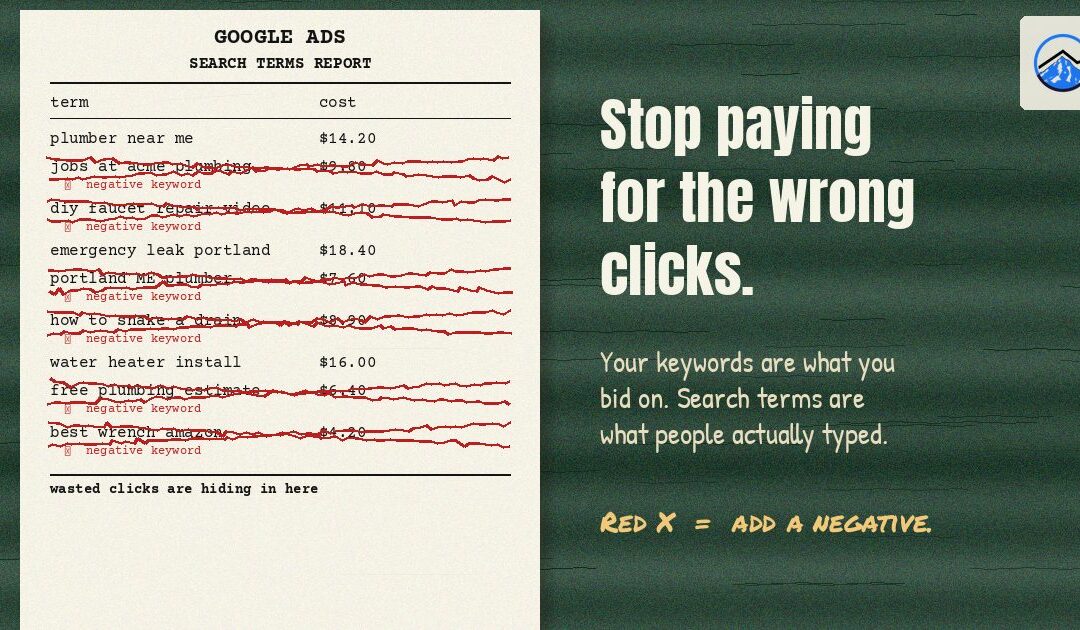
If you run Google Ads for your business, there is one report worth opening every week: the search terms report. It shows what people actually typed into Google before they clicked your ad. For many small accounts, it is where wasted budget hides in plain sight. Here is how to read it and what to do with what you find.
Keywords vs. search terms
Your keywords are what you tell Google you want to show up for. Search terms are the real searches that triggered your ads. Depending on your match types, Google can show your ad for searches it considers related to your keywords, and its idea of “related” is not always yours. A keyword like roof repair can match searches for roofing jobs, DIY roof patch kits or roof repair in a city you do not serve.
Where to find the report
In Google Ads, open the campaign, then look under Insights and reports for Search terms. (Google moves menus around from time to time; in some account views it sits under Keywords.) Set the date range to at least the last 30 days so you have enough data to see patterns.
How to read it
- Sort by cost. Start with the terms that spent the most money.
- Compare cost with conversions. Look for terms that have spent real money with no calls, form fills or other conversions. That only works if conversion tracking is set up correctly, so confirm that first.
- Check the match type column. It shows which keyword match type triggered each search, which helps you see where loose matching is costing you.
- Know what is missing. Google does not show every individual search. Low-volume searches are withheld for privacy, so treat the report as a large sample rather than a complete list.
Common wrong clicks for local businesses
- Job seekers: searches with words like jobs, hiring, careers, salary or apprenticeship.
- Do-it-yourselfers: how to, DIY, tutorial, video, parts.
- Bargain or free hunters: free, cheap, used, rental, when those do not fit what you sell.
- Wrong location: this one is very real here. Searches for Portland, Maine show up in Portland, Oregon accounts surprisingly often, along with cities outside your service area.
- Wrong service: a closely related service you do not offer, such as commercial work when you only do residential.
- Specific competitors: people looking for another business by name usually want that business.
Add negative keywords the right way
A negative keyword tells Google not to show your ad for searches containing that word or phrase. A few rules keep negatives from causing more harm than good:
- Understand negative match types. A negative broad match keyword blocks searches containing all of its words in any order, phrase blocks that exact phrase, and exact blocks only that exact search. Unlike regular keywords, negatives do not automatically cover close variants, so add plurals and common misspellings yourself.
- Use shared negative keyword lists for words that never make sense, such as jobs or DIY, and apply them to every campaign.
- Do not over-block. Adding “cheap” might be right for a luxury remodeler and wrong for a budget mover. Ask whether a real customer could use the word.
Check your location setting too
In campaign settings, the location option called Presence targets people who are in or regularly in your chosen locations. The broader “presence or interest” option can also show ads to people who are only searching about those places. For most local service businesses, Presence is the safer choice.
A simple weekly routine
- Open the search terms report for the last 7 to 30 days.
- Sort by cost and review the top terms.
- Add clear mismatches as negatives, at the list, campaign or ad group level.
- Add strong converting terms as keywords if they are not already.
- Note what you changed so you can compare results next week.
This is a core part of how we manage search engine marketing and Google Ads for local businesses, and it pairs well with the organic side of Portland internet marketing. We work with advertisers in Portland, Longview and across our service areas.
Frequently asked questions
How often should I review my search terms report?
For new or higher-spend campaigns, weekly. For small, stable campaigns, every two to four weeks is usually enough to catch new problems.
Will adding negative keywords reduce my traffic?
Yes, that is the point. You should see fewer irrelevant clicks, and the budget you save can go toward searches that are more likely to become customers.
Should I use broad match keywords?
Broad match can work when conversion tracking is accurate and you use automated bidding, but it reaches the widest range of searches, so it needs the most attention in the search terms report.
Want help with this?
Think your ad budget is going to the wrong searches? Three 7 Projects is a Happy Valley-based marketing agency that works with small businesses across the Portland metro and Southwest Washington. Call us at 503-799-0407 or send us a message on our contact page and tell us what you are working on.